Live job weather
Color-coded forecast on every project row
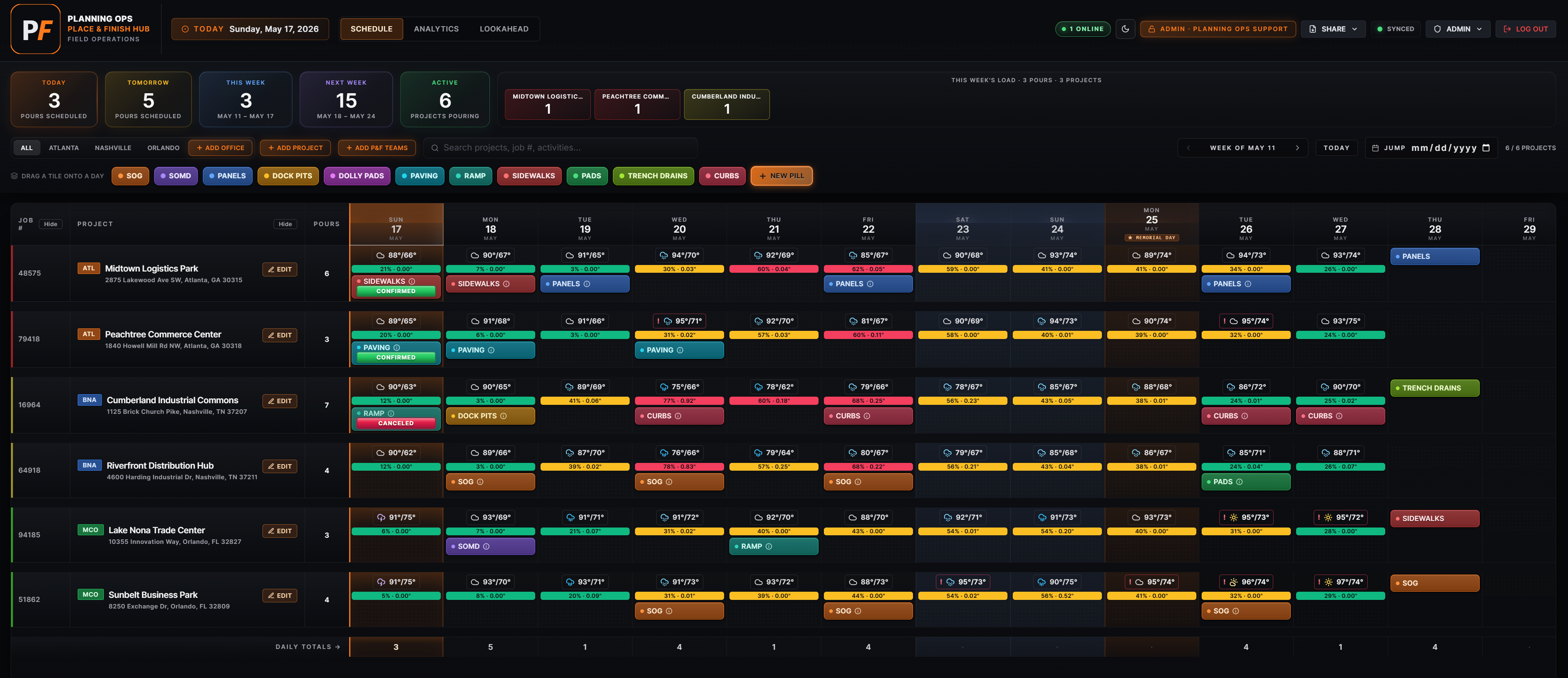
Each project’s ZIP code drives a rolling 10-day forecast painted across the row at the top of the job. Green means good to pour, amber means hedge (30–60% rain), rose means hold (60%+), and a bold red ! flags severe weather. Office and field teams make go, hold, or shift decisions from the same numbers.
Double-booking detection
Catch the conflict before the morning meeting
Assign a crew — or a screed, operator, or pump — to a pour and the hub indexes every assignment. Overlapping bookings get a red ⚠ marker on both pills, a click-to-jump popover, an in-editor warning the moment you pick someone busy, and a slim collapsible bar above the grid. The full conflict list also ships on every Schedule XLSX and PDF.
Cancellation notify
One click tells everyone who needs to know
Set a pour to Canceled with a reason — Weather (Rain, Cold, Heat, Snow/Ice, Wind, Other), Customer Delay, Material Issue, Crew Unavailable, Equipment Issue, or Other. The hub auto-assembles recipients (project contacts, assigned crew lead & office, screed/pump operator or sub) and sends a high-importance email to all of them (SMS texting coming soon). Optionally clone the pour to a reschedule date with one-click Undo.
Truck pickup & dropoff
Schedule the logistics, not just the pour
Optional driver roster (name, phone, email). Tag any day with a pickup or dropoff — amber ▲ out, green ▼ in — plus a note, independent of the pour, so a truck can land on a day with no placement. Logistics pills sit under the pours and print on the Schedule export.
Screed & operator tracking
Your equipment and who’s running it
Own your screeds? Keep a roster of machines (number + model), operators, and subcontractors, then pick them right in the pour editor instead of retyping. Screed and operator double-bookings are flagged exactly like crews. Trucks and screeds are on by default — switch either off per workspace if you don’t use them.
Pump truck tracking
Pumps, operators, and the boom you need
Track concrete pump trucks alongside your screeds: a roster of pumps (unit #, boom size, make/model), operators, and subcontractors. Boom size is a dropdown of standard reaches (line pump, 28–61 m). Check Concrete Pump on a pour and it expands to pick your own pump + operator or a pump subcontractor — with the same double-booking detection, and the selected pump operator or sub pulled straight into cancellation notices. Off by default; flip it on per workspace.
Cubic yards totals
Yards on every card, every pivot, every export
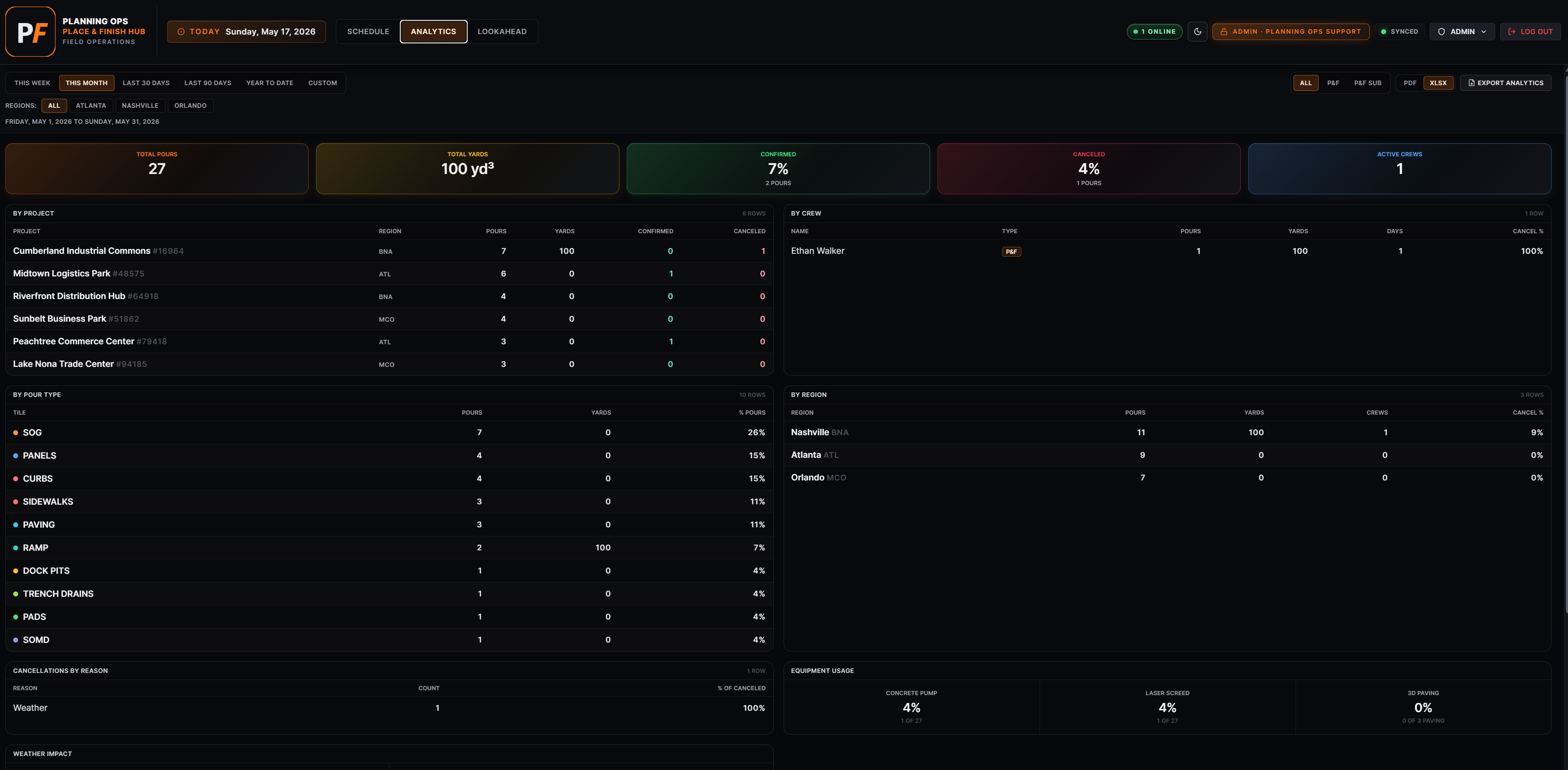
Enter yards on each pour and the totals roll up through Today / Tomorrow / This Week KPI cards, per-region pivots, and Analytics tiles. Canceled pours drop automatically.
365-day Lookahead
Stage it, then approve it onto the Schedule
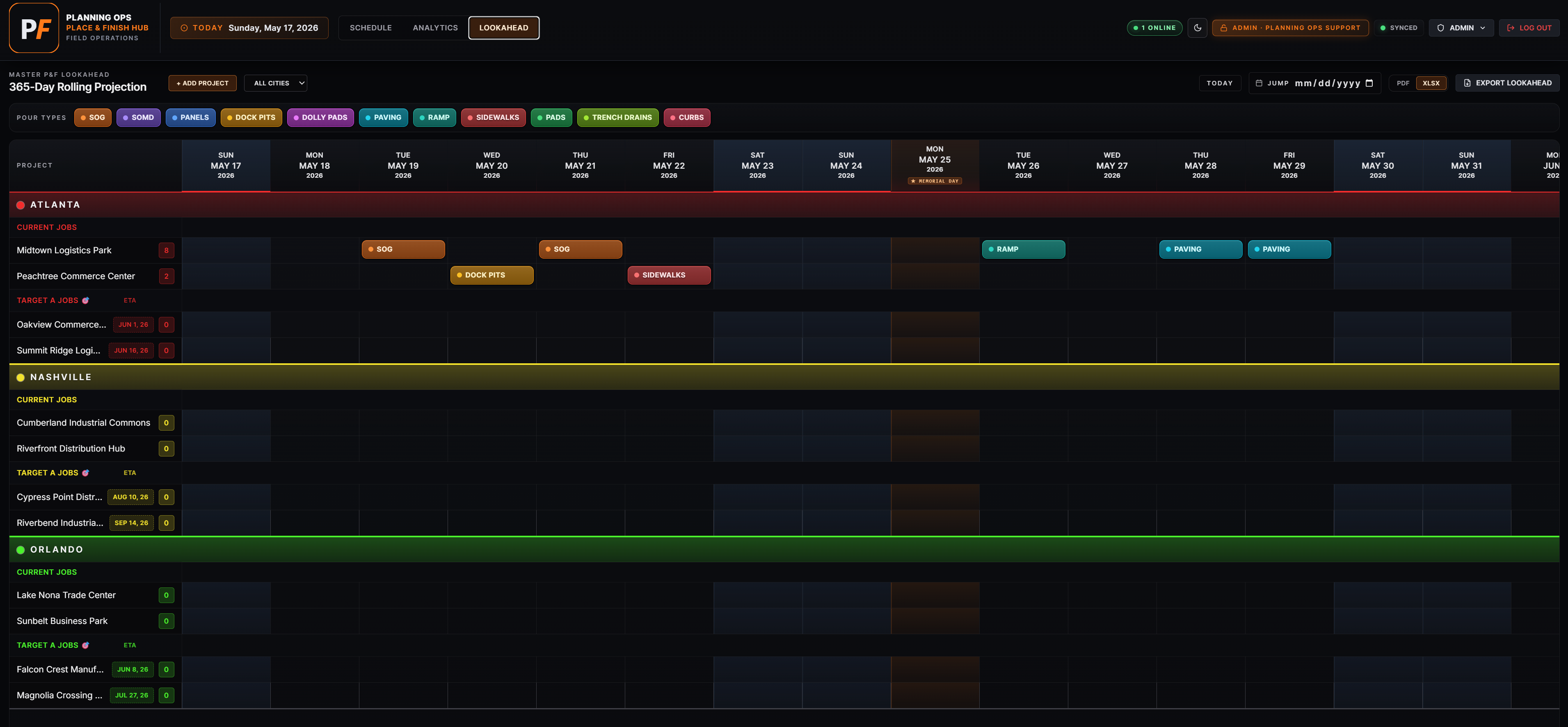
A separate 365-day rolling pill calendar — projects group by city into Current and Target (with an ETA chip). Drag tiles to stage, then hover a pill and click the green ✓ to approve it straight onto the daily Schedule. Promote a target to a live project, filter by city, export PDF/XLSX. Realtime-synced — field leads can get Collaborator access (one office's Lookahead only) so they own staging without the full Schedule.
Drag-to-schedule
Activity pill palette — your terminology
SOG, SOMD, PANELS, DOCK PITS, DOLLY PADS plus any custom pills you add. Drag a pill onto any date cell — no dialog, no friction. Click an existing pill to edit label, yards, crew, status, and notes.
Branded deliverables
XLSX + PDF that look like your company at 6 a.m.
Schedule (XLSX or PDF) — colored pour pills, weather row, region grouping, conflict list, yards totals. Analytics export pairs every chart with a branded cover. Your logo on every page.
Email distribution
One send · branded HTML body · XLSX attached
Email the schedule to your user directory or external recipients (suppliers, GCs) with a branded HTML body plus the XLSX as an attachment. Sent via Resend; every distribution is recorded in the audit trail.
Defensible history
Audit log + version snapshots
Who touched which pour and when — filter, click-to-restore, export as CSV. Version snapshots let you roll back the entire schedule if something goes sideways.